

eAOR Updates - Pending Issues
DIVISION OF AIR RESOURCE MANAGEMENT
The purpose of this page is to track issues and solutions with the new 2026 upgrade to the eAOR system.
eAOR Pending Issues:
- Facility Form – Section D: Owner/Contact Information
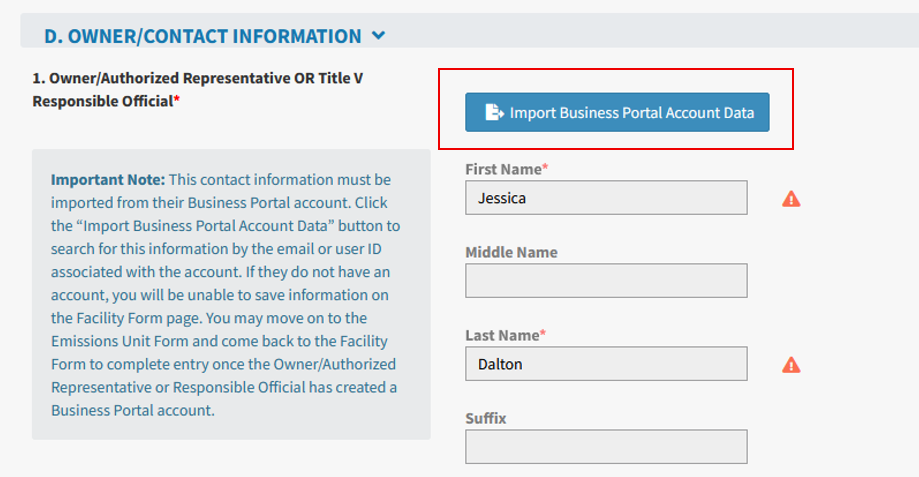
- Some users are getting an error message on this screen when trying to save Owner/Authorized Representative (AR) or Responsible information (RO).
- It appears to be related to when the Owner/AR or RO does not have a Business Portal account or when their information is manually entered and the email address entered doesn’t match with their Business Portal account information.
- A fix for this issue was deployed on 3/3/2026. Users will now be required to use the “Import” function to fill in the Owner/AR or RO information, which should prevent the error message users were previously getting.
- If the Owner/AR or RO does not have a Business Portal account, you will be unable to save information on the Facility Form page. You may move on to the Emissions Unit Form and come back to the Facility Form to complete entry once the Owner/AR or RO has created a Business Portal account.
Image
- Verification error for PM10-Primary or PM2.5-Primary
- Some users have reported the verification check is advising that the CPM+PM10 is not equal to PM10-Primary when it is in fact exactly equal. The issue may also exist for PM2.5-Primary.
- The fix for this issue was deployed on 3/11/26. If users are still experiencing issues with this verification check, please report it to: DARM.Helpdesk@FloridaDEP.gov.
- Verification Check shows report errors for the ORGHAP pollutant
- Users have reported an issue where a verification check for the ORGHAP pollutant may reference the reported emissions value for VOC instead of ORGHAP.
- The fix for this issue was deployed on 3/5/26. If users are still experiencing issues with this verification check, please report it to: DARM.Helpdesk@FloridaDEP.gov.
- Calculation Worksheet is blank/not loading
- Users have reported an issue for some pollutants where the Calculation Worksheet grid will not load and shows a blank page. Users are unable to edit the worksheet or add new rows.
- Developers are working on this issue, and we will post an update here as soon as it’s resolved.
- Workaround – You can manually write your calculations into the Emissions Calculations column and manually enter the emissions value. You can also provide calculations as a report attachment in the Attachments section on the Facility Form, then reference the attachment in the Emissions Calculations field.
- Issue on AOR Submission Signature Page
- Some users have reported seeing a blank screen when they click on Sign AOR and the submission is not going through.
- Developers are working on this issue, and we will post an update here as soon as it’s resolved.
- Issue with Starting a New AOR
- A few users have reported that nothing happens when they try to start a new AOR.
- This appears to be an isolated issue for certain facilities.
- The fix for this issue was deployed on 3/5/26. If users are still experiencing issues with starting an AOR, please report it to: DARM.Helpdesk@FloridaDEP.gov.
- Issue with the Primary and Secondary Control fields
- Users have reported that they are seeing messages on the verification report that information needs to be entered for these fields and when they try to update the field, it doesn’t save.
- The fix for this issue was deployed on 3/5/26. If users are still experiencing issues with this verification check, please report it to: DARM.Helpdesk@FloridaDEP.gov.
- Email notice to the Owner/Authorized Representative or Responsible Official that the AOR is ready for submittal.
- This email is not being transmitted to the appropriate contact.
- The fix for this issue was implemented on 2/27/26. The Owner/Authorized Representative or Responsible Official should now be getting these emails. If not, please report it to: DARM.Helpdesk@FloridaDEP.gov.
- Required fields after entering a zero Process Rate/Fuel Usage Rate
- Users are reporting that the verification check is requiring values be entered for marked pollutant emissions and also Fuel % Sulfur, Fuel % Ash, Fuel Heat Content after entering a Process Rate of zero. These fields should not be required when the Process Rate is zero.
- The fix for this issue was implemented on 2/27/26. If users are still experiencing issues with this verification check, please report it to: DARM.Helpdesk@FloridaDEP.gov.
- Data missing in prefilled fields such as the EU Status and/or "Error loading content" message being displayed.
- Workaround: Back out to the eAOR Facility Home Page and reopen the facility AOR. The data should then show up.
- Performance Issues
- It may take 20+ seconds to load the AOR for facilities with a high number of EUs.
- Developers are still working on this issue.
- Please be patient and let the page load.
- If you exit and try starting again, it may create duplicative records.
- Recalculate Emissions Function
- This function is working, but there may be some issues with formulas migrated from the 2024 AORs that cause error messages.
- If you get error messages, double check your formulas in the individual calculation worksheets for each pollutant and make any corrections, if applicable, then click save and your data should update correctly.
- We still advise to verify individual calculation worksheets even if the Recalculate button works for you.
- Inaccurate Prefilled Pollutant Data
- This issue appears to be resolved but we still advise everyone to double-check their imported data (for both 2025 and the 2024 comparison data).
- 2024 AOR forms can be accessed from Oculus, but the attachments have not been uploaded yet.
- Contact Griffin, Griffin.W.Jones@FloridaDEP.gov, if you need a copy of a 2024 AOR attachment.
- Calculation Worksheet Used
- Users reported that a 'Y' is being displayed in the Calculation Worksheet Used field even if they didn’t use the calculation worksheet.
- This is a very low priority issue that will be fixed as time allows.
- Users can ignore this issue as it’s not a field that affects the integrity of the AOR.
- Issue on AOR Submission Signature Page
- Some users have reported receiving an error message when they click on Sign AOR.
- This issue was resolved on 2/25/26. Users are now able to sign and submit.
- Manage Contributor Function
- We made improvements including adding distinct User Roles to address issues related to multiple AORs being started and confusion over how to add/manage contributors.
- You no longer have to manually add the RO as a contributor to the AOR – they are automatically added once their contact info is entered/saved.
- Please see slides 9-11 of the 2026 eAOR Facility Training Presentation for more details on these User Roles.
Last Modified: Monday, Mar 16, 2026 - 02:42pm